Online Database Migrations: Expand, Then Contract, with a Clear Rollback Boundary
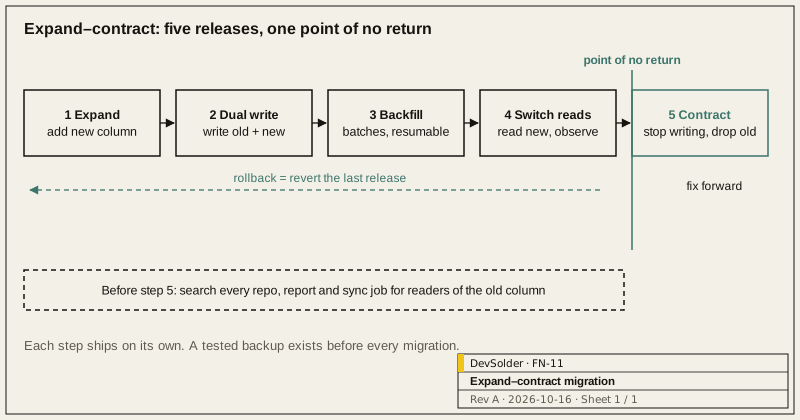
Direct answer. When you change a production schema, the danger is usually not the SQL itself but the period when old and new versions of the code run side by side. We use expand-contract: add without removing so both versions keep working, backfill historical data in batches, switch reads, and only drop the old structure once nothing uses it. Each step is its own release. Until the drop you can roll back at any point; after it you can only fix forward.
1.0 Why not do it in one step
During a rolling deployment, old instances are still serving requests, and mobile apps or external systems may still call the old interface. A migration that renames a column breaks the old code that has not been retired yet, immediately. Some DDL on large tables also holds locks for a long time and queues ordinary requests behind it.
2.0 The five steps
| Step | What happens | Reversible? |
|---|---|---|
| 1 Expand | Add the new column or table, nullable or with a default; the old structure is untouched | Yes, drop the new column |
| 2 Dual write | New code writes to both old and new; reads still use the old structure | Yes, revert the code |
| 3 Backfill | Copy historical data into the new structure in batches, re-entrant and pausable | Yes |
| 4 Switch reads | Reads move to the new structure and are observed for a while; the old one is still written | Yes, switch back |
| 5 Contract | Stop writing the old structure, then drop it | Not after the drop |
Pause before step 5 and confirm that no code, report or external sync still reads the old column. We check with a search across every repository plus the database access logs, not from memory.
3.0 Backfilling
- Work in primary-key ranges, one short transaction per batch with a pause between batches, to avoid long transactions and replication lag.
- Make the backfill re-entrant: after an interruption it resumes where it stopped, and running it twice gives the same result.
- Record progress and failed rows, and handle failures separately so one bad row does not block the whole backfill.
- New writes during the backfill are already covered by dual writing, so the backfill only deals with history.
4.0 Operations that lock tables
Databases and versions differ a lot, so read the official documentation before you start. Some common cases:
- On PostgreSQL, build indexes with CREATE INDEX CONCURRENTLY so writes are not blocked. It cannot run inside a transaction block, and a failure leaves an invalid index that has to be dropped and rebuilt.
- To add a NOT NULL column to a table that already has data, add it as nullable, backfill, then add the constraint.
- For MySQL, check which operations online DDL supports, and with which algorithm, for your version; for large tables consider a tool such as gh-ost.
- Set a lock timeout on the migration session. If it cannot get the lock it should fail and retry later, not wait in the lock queue and block every request behind it.
5.0 Migrations in CI and the release process
- Migration files are numbered in order and kept in the repository. A released migration is never edited; mistakes are fixed with a new migration.
- CI runs two paths: all migrations on an empty database, and the new migrations on a database at the previous release. Both must produce the same schema.
- Before release, run the migration on a redacted copy of production data and note how long it takes, to decide whether it belongs in a quiet period.
- Every migration is preceded by a usable backup that has been through a restore drill. A backup that has never been restored does not count.
If an existing system needs a major schema change, or migrations keep causing trouble, see Web, Cloud and Device Management, or discuss a project with us.
References
- Martin Fowler, Parallel Change: https://martinfowler.com/bliki/ParallelChange.html
- PostgreSQL, CREATE INDEX: https://www.postgresql.org/docs/current/sql-createindex.html
- gh-ost: https://github.com/github/gh-ost
Frequently asked questions
Does a small project really need all these steps?
If a short maintenance window is acceptable and no client still depends on the old interface, stopping the service and changing the table is simpler and perfectly fine. Expand-contract is for systems that cannot stop, or where old and new code will inevitably run at the same time.
Can dual writes leave the data inconsistent?
That risk is real. Before switching reads, sample and compare old and new data, and after the backfill compare the key fields in full once more. Where the two writes can share a transaction, put them in the same one.
Can we use ORM-generated migrations as they are?
They make a good first draft, but someone should read the generated SQL before release, especially for renames, type changes and drops. Tools often turn a rename into drop-column-then-add-column, and the data is gone.
What if a migration fails halfway?
Before step 5, revert the most recent release and you are back where you were. A structure that has already been dropped can only be restored from backup or fixed forward, which is why the drop comes last, ships on its own, and follows enough observation time.