BLE and USB Device Protocol Design Notes
Direct answer. Write the device protocol down before either side is built: transport mapping, frame format, message types, versioning, error codes and timeouts. Keep the application protocol independent of BLE or USB so it can be tested over a serial cable. A shared spec plus a host-side test harness lets firmware and app teams work in parallel and find disagreements early.
1.0 Where device protocols go wrong
Most protocol problems are not about BLE or USB as such. They come from an interface that was never written down. The firmware engineer picks a byte layout, the app developer reads it from a log, and the two drift apart. By the second firmware release nobody can say which side is correct, an update breaks the app version already in the store, and the fix needs a coordinated release on both sides.
The spec covers transports, frame, message table, error table and timeouts. Write it before the first sniffer capture, not after.
2.0 Layering
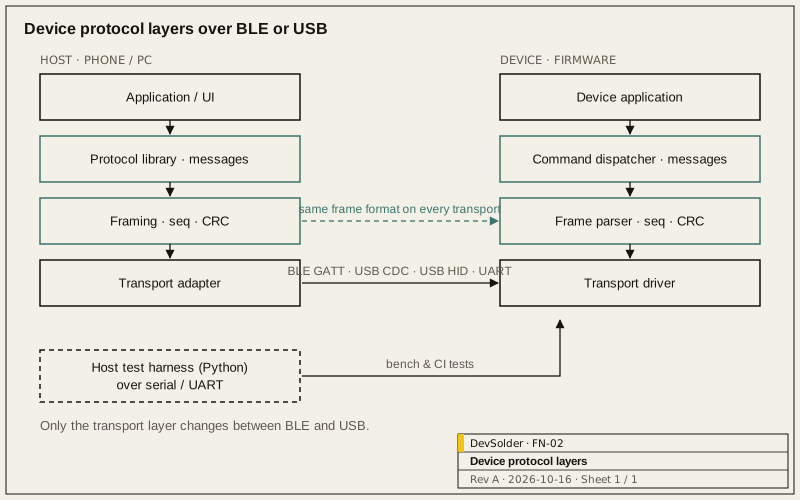
We separate the protocol into layers so each can be tested on its own:
| Layer | Responsibility | Changes when |
|---|---|---|
| Transport | Moving bytes: BLE GATT characteristics, USB CDC-ACM, USB HID reports, UART | Hardware or OS changes |
| Framing | Message boundaries, length, integrity check, sequence number | Rarely |
| Messages | Command and response types, payload encoding, error codes | New features |
| Application | What the device does with a command | Product behaviour changes |
The framing and message layers should not know which transport is underneath. That makes it possible to run the same protocol over a UART on the bench, through a USB-serial adapter in production test, and over BLE in the product.
3.0 Choosing the transport
| Need | BLE | USB CDC-ACM (virtual serial) | USB HID |
|---|---|---|---|
| Wireless to a phone | Native fit | Not applicable | Not applicable |
| Driverless on desktop OSes | Needs OS Bluetooth stack | In-box driver on Windows 10 and later, macOS and Linux | Driverless |
| Browser access | Web Bluetooth where supported | Web Serial where supported | WebHID where supported |
| Throughput | Limited by connection interval and MTU | Higher | Limited by report size and polling |
| Power | Designed for low power | Device can draw bus power while connected | Same as CDC |
Browser support for Web Bluetooth, Web Serial and WebHID varies by browser and platform, so check current support for the browsers your users run before relying on them. Many products use both: BLE for the phone app, USB for configuration, factory test and recovery.
3.1 Mapping onto BLE GATT
Two common approaches:
- Attribute-per-value. Each setting or reading is its own characteristic. Easy to inspect with generic BLE tools, but adding features means changing the GATT table, and multi-field updates are not atomic.
- Message pipe. One characteristic for host-to-device writes, one for device-to-host notifications, carrying framed messages. One protocol for all features; the GATT table stays stable.
Once the device exposes more than a handful of values we use a message pipe, and keep standard services (Device Information, Battery) as attributes so generic tools still work. Custom services need 128-bit UUIDs; the Bluetooth SIG’s assigned numbers list covers the standard ones.
Throughput and latency depend on connection parameters and the negotiated ATT MTU, which the phone controls more than the device. Write the protocol so that a message can span several notifications and be reassembled, and do not assume a particular MTU.
3.2 Mapping onto USB
CDC-ACM looks like a serial port to the host and suits a byte-stream protocol with framing. HID gives fixed-size reports and works without drivers, which helps for locked-down corporate PCs; the framing layer then splits messages across reports. The USB-IF publishes both class specifications.
4.0 The frame
The frame format we start from:
| Field | Size | Notes |
|---|---|---|
| Start marker or length prefix | 1–2 bytes | Length prefix on BLE/HID; COBS or SLIP-style delimiting on byte streams |
| Protocol version | 1 byte | Major version of the frame format |
| Sequence number | 1–2 bytes | Matches responses to requests; detects drops |
| Message type | 1–2 bytes | Command, response, event, error |
| Payload length | 2 bytes | Explicit, even if the transport also has a length |
| Payload | variable | Encoding chosen per project (fixed structs, TLV, CBOR, protobuf) |
| Integrity check | 2–4 bytes | CRC on byte streams; may be omitted where the transport already checks |
Payload encoding is a trade-off between code size on the device and flexibility. Fixed little-endian structs are smallest and hardest to evolve. TLV or CBOR let you add optional fields without breaking old readers.
5.0 Versioning and compatibility
Write the compatibility rule down. Ours:
- The device reports its protocol version and feature flags in response to a “hello” or “get info” command, which never changes shape.
- New fields are added as optional. Readers ignore fields they do not understand.
- Removing or changing the meaning of a field requires a major version change, and the app keeps support for the previous major version for a documented period.
- Firmware and app release notes state which protocol versions they support.
6.0 Errors, timeouts and state
Every command gets exactly one response: success with data, or an error code from a documented table. Typical error classes are malformed frame, unknown command, invalid parameter, busy, not permitted in current state, and internal failure. The table belongs in the spec, not only in the code.
Timeouts are part of the protocol too. State the maximum response time per command class, what the host does on timeout (retry with the same sequence number, or give up), and how long the device waits for the rest of a multi-part message before discarding it.
Long operations, such as a firmware update or a calibration run, should return immediately with “accepted” and report progress as events, rather than blocking the response.
7.0 Security considerations
BLE pairing and bonding protect the link, but they do not decide what an authenticated peer is allowed to do. List which commands change state, which need an authorised session, and which are safe to expose to any connected host. Factory and debug commands should be disabled or locked in production firmware, and the spec should say how.
8.0 Test harness
We write a small host-side tool, in Python unless the project dictates otherwise, that speaks the protocol over a serial port. It does three jobs: lets the firmware engineer exercise commands before any app exists, runs scripted regression tests in CI against a board on the bench, and gives the app team a reference implementation to compare against. Fuzzing the frame parser with malformed input from the same tool catches a class of crash that normal use never reaches.
9.0 Handover
- Protocol specification: transports, frame, message table, error table, timeouts, version rules.
- GATT table or USB descriptors.
- Host test tool and its scripts.
- A captured example session for each command.
The Embedded Firmware page describes the device side of this work, and Web, Cloud and Device Management covers apps and back ends that talk to devices. For a review of an existing protocol, start from the Discuss a Project form.
References
- Bluetooth Core Specification: https://www.bluetooth.com/specifications/specs/core-specification/
- Bluetooth Assigned Numbers: https://www.bluetooth.com/specifications/assigned-numbers/
- USB Class Definitions for Communication Devices 1.2: https://www.usb.org/document-library/class-definitions-communication-devices-12
- USB Device Class Definition for HID: https://www.usb.org/hid
Frequently asked questions
Should we use a standard BLE profile or a custom service?
Use a standard service where one fits the data, such as Battery or Device Information, because generic tools and operating systems understand it. Product-specific features need a custom service. A single message-pipe service keeps that custom part stable as features are added.
What payload encoding should we pick?
Choose from the device's flash and RAM budget and how often you expect the protocol to change. Fixed structs suit small, stable command sets. TLV or CBOR cost more code but let you add fields without breaking older apps.
How do we keep old apps working after a firmware update?
Make the version query command permanent, add fields as optional, and make readers ignore unknown fields. Breaking changes go into a new major version, with the old one supported for a period you write down in both release notes.
Can the same protocol run over BLE and USB?
That is the reason for keeping framing and messages independent of the transport. Only the transport adapter changes. It also lets factory test and recovery tools use a cable while the product app uses BLE.
When should the protocol be written?
Before firmware and app work start in earnest. A first draft can be short: transports, frame, five or six commands and the error table. It then changes through review rather than through debugging.