Integrating Orders with an ERP: Manual Review, Idempotent Pushes and a Sync Log
Direct answer. The most common mistake in an ERP integration is treating “the ERP accepted the order” as “the order succeeded”. Many ERPs still review orders manually and post the stock movement afterwards, and the platform can only wait. We give every push a stable business key so it can be retried safely, learn the status by polling instead of trusting a single response, write every sync action to a sync log, and run a daily reconciliation to find documents that no longer match on both sides.
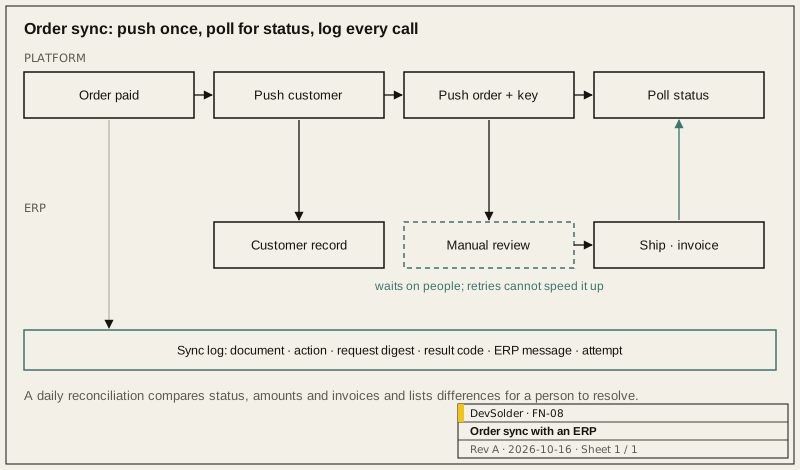
1.0 Draw the business flow first
Before writing any integration code, sit down with the ERP implementer and the business owner and write out every step from order to invoice. Mark which side each step happens on and whether it is automatic or manual. A typical chain: create customer, push order, ERP review, post stock movement, ship with tracking number, confirm payment, pull invoice.
Marking the manual steps matters. An order the platform shows as “processing” may be sitting in someone’s queue inside the ERP, and no amount of retrying will move it. The UI and the alerts need to separate “we are waiting on the ERP” from “the push failed”, or operations will bring both kinds of problem to the developers.
2.0 Make pushes safe to retry
Timeouts are the hard case: the request may or may not have arrived. If the ERP creates a second document on retry, you have a duplicate order.
- Every document carries a stable business key, usually the platform order number, and the ERP deduplicates on it. If the ERP cannot deduplicate, query whether the document exists before pushing.
- Push master data dependencies first: a new customer is created before its order. If a dependency is not ready, the document waits in a local queue instead of being forced through.
- Code mismatches are normal, not exceptional. Agree in writing what to send when a product or customer has no ERP record yet, and which side fills the gap.
- ERP errors often hide inside an HTTP 200 body. One client recognises those error semantics so that each call site does not interpret them differently.
3.0 Status comes from polling
A push response only tells you the ERP received the document. Later states come from a scheduled poll:
| Design point | Our choice |
|---|---|
| Scanning | Keyset pagination on the primary key, not OFFSET; stable as volume grows and does not skip rows between pages |
| Order | A cursor that advances in a loop, resuming where the last run stopped, so the same batch of failures is not retried every time |
| Backoff | Documents that keep failing are polled less often, up to a cap; beyond the cap they go to a person |
| Concurrency | Only one worker handles a given document at a time, enforced with a row lock or a lease |
4.0 The sync log is where troubleshooting starts
Every call writes one row: document number, action, request digest, result code, the ERP’s message, duration and attempt number. Passwords, tokens and full personal data stay out.
With that table, “why hasn’t this order shipped?” starts with a query rather than a trawl through application logs or a request for screenshots from the ERP team. We also keep a troubleshooting runbook: each newly solved problem gets its symptom, root cause, fix and the diagnostic queries, newest entry first. ERP integration problems tend to come back in different forms, and that runbook ends up more useful than any dashboard.
5.0 Reconciliation
Even when every step is correct, the two sides drift: someone edits or cancels an order directly in the ERP, or a poll result never got written. A daily reconciliation compares order status, amounts and invoices and puts the differences on a list for a person. It never “corrects” either side automatically; its output is a work list.
6.0 Development and testing
- The ERP adapter is an interface with a simulated implementation for local work and CI, so the full order lifecycle, invoicing included, runs offline.
- ERP test environments often differ from production or do not exist. During integration testing, store the real requests and responses for each endpoint, redacted, and use them as regression cases.
- Reconcile more often in the first weeks after go-live to surface cases the test environment never showed.
If you are connecting an ordering system to an ERP, or an existing integration keeps breaking, see Web, Cloud and Device Management, or discuss a project with us.
References
- Stripe, idempotent requests: https://docs.stripe.com/api/idempotent_requests
- Use The Index, Luke, keyset pagination: https://use-the-index-luke.com/no-offset
Frequently asked questions
The ERP only exposes database views, not an API. Can we still integrate?
Read-only views are fine for pulling products and stock. Writing documents straight into the ERP database is risky: it bypasses the ERP's own validation and makes it hard to say who is responsible when something breaks. Writes should go through the ERP's API or import function, and the read/write boundary needs to be agreed with the ERP implementer first.
How often should stock be synchronised?
That depends on what overselling costs you and how much load the ERP can take. Re-checking stock in real time at checkout is usually more reliable than pushing the scheduled sync to a very high frequency, and it is kinder to the ERP.
Review on the ERP side is slow and customers keep seeing 'processing'. What can we do?
Show honestly where the order is waiting, for example 'awaiting ERP review', together with the handling time agreed with the business. The platform cannot do the review for the ERP team, but it can make the wait visible and alert the owner automatically when it runs over.
If we change ERP later, does the platform need a rewrite?
If the integration code sits in one adapter, changing ERP mostly means rewriting that adapter, redoing the code mappings and testing end to end. If business code calls the ERP API all over the place, the change is far larger, which is why we build the adapter layer from the start.