BOM Risk Review and Component Lifecycle
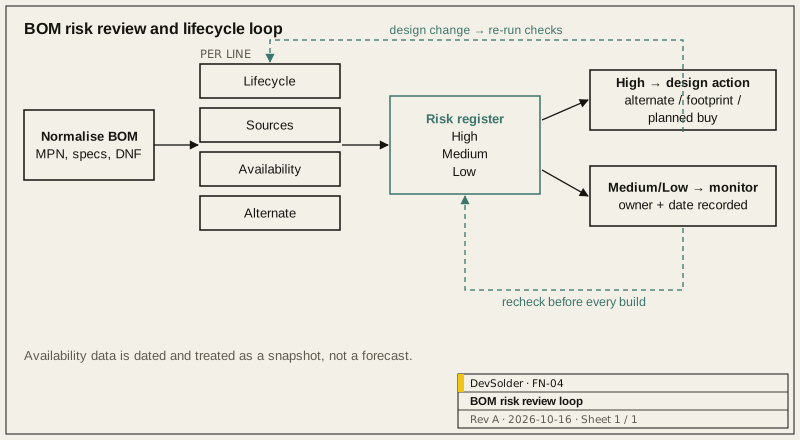
Direct answer. A BOM risk review goes line by line before the design is frozen. For each part, record lifecycle status, number of manufacturers, availability and whether a checked alternate exists. Rank the risks, fix the high ones in the design, and recheck before every build. Each check carries a date and a source, because availability data goes stale.
1.0 Why review the BOM before the design is frozen
A second-source footprint is a schematic and layout edit while the design is open; after the board is released, the same change costs a respin. The same goes for swapping out a part the manufacturer has already marked not-recommended-for-new-designs. Found when a production order is placed, either problem can mean a respin, requalification and a gap in shipments.
We run the review at least twice: once when the schematic is close to complete, and again before release. After that, it is rechecked before each build.
2.0 Normalise the BOM first
Scoring a messy BOM produces a messy register. Before scoring anything, check that:
- Every line has a manufacturer name and full manufacturer part number, including packaging and temperature-grade suffixes.
- Generic passives have a specification (value, tolerance, voltage, dielectric, package) so equivalents can be chosen deliberately.
- Reference designators match the schematic and the placement file.
- Do-not-fit parts are marked.
- Custom parts (cables, mechanical parts, labels, programmed devices) have their own drawings or specifications.
3.0 What we check per line
| Check | Question | Where the information comes from |
|---|---|---|
| Lifecycle | Active, not recommended for new designs, last-time-buy announced, obsolete? | Manufacturer product page and product change notifications; distributor listings |
| Sources | How many manufacturers make a part that fits this footprint and specification? | Manufacturer cross-references; our own comparison of datasheets |
| Availability | Is it stocked at authorised distributors in the quantities you need? What lead time is quoted? | Authorised distributor listings at the time of the check |
| Alternate | Is there a named alternate, and has it been checked electrically and on the footprint? | Datasheet comparison; build with the alternate fitted |
| Special handling | Moisture sensitivity, programming before assembly, export classification | Datasheets, manufacturer compliance pages |
| Compliance | RoHS/REACH declarations available where your market needs them | Manufacturer compliance documents |
Availability and lead times change quickly. We record the date of each check and do not present a snapshot as a forecast.
3.1 Alternates that actually work
“Pin-compatible” in a cross-reference list is a starting point. Before listing an alternate in the BOM, compare the datasheets for the parameters that matter in this circuit: for a regulator, input range, output accuracy, stability requirements on output capacitance, soft-start and thermal limits; for a microcontroller, peripheral differences that firmware depends on. Where possible, fit the alternate on part of a prototype build. Until it has been on a board, list it as a candidate, not as approved.
For parts with no direct alternate, a dual footprint or a small daughter-board interface can be designed in to keep options open. That decision belongs in the design phase.
3.2 Reading distributor data with care
Stock figures and lifecycle flags on distributor sites are useful signals, but they are not commitments. A large quantity shown today can be allocated to another customer tomorrow, and lifecycle fields sometimes lag the manufacturer’s own notices. We cross-check the manufacturer’s product page for lifecycle status, use authorised distributors only for availability, and treat brokers’ listings as a separate, higher-risk channel that needs its own inspection and traceability checks before use.
4.0 Scoring and the risk register
We use a simple, transparent score rather than a weighted formula that hides judgment:
| Level | Typical condition | Action |
|---|---|---|
| High | Single source and no checked alternate; or lifecycle notice already issued; or no authorised stock for planned quantity | Change design, qualify an alternate, or plan a buy, before release |
| Medium | Single source with stable lifecycle; or long quoted lead time; or alternate identified but not built | Record mitigation and owner; recheck before each build |
| Low | Multiple sources, active, stocked, checked alternate | Recheck before each build |
The register is a table: line, part, level, reason, mitigation, owner, date checked. It is short enough to read in a review meeting, and it travels with the design package.
5.0 Typical high-risk lines
These are categories that deserve attention in almost every review. They are patterns, not statistics.
| Category | Why it lands in the high column |
|---|---|
| Microcontrollers, SoCs, radio modules | Firmware depends on them, so a swap is never purely a hardware change. Radio modules can carry certifications tied to the exact module. |
| Display panels, touch controllers | Built in production runs with short lifecycles and few drop-in equivalents. |
| Custom or semi-custom parts | Cables, transformers, enclosures and labels depend on one supplier’s tooling. |
| Connectors | A second source has to mate with the other half, not just fit the footprint. |
| Specialised analog parts, sensors | Nominally similar parts can behave differently in the circuit. |
6.0 Lifecycle monitoring after release
Release is not the end of BOM risk. Manufacturers publish product change and discontinuation notices; distributors show lifecycle status changes. Someone needs to watch for them and decide what to do:
- Subscribe to notifications for each active part where the manufacturer offers it.
- Recheck the register before each production build.
- When a last-time-buy notice arrives, decide between a buy that covers the remaining product life, a qualified alternate, or a design change, and record the decision.
Ongoing monitoring and alternate qualification fit the Support stage, where updates, alternates and remote debugging continue over the product’s life.
7.0 What we hand over
- The normalised BOM with approved alternates.
- The risk register with check dates and sources.
- Notes on parts that need special handling or programming.
- Recommendations for design changes that would reduce risk, where they were not made.
The BOM, Alternates and Procurement Risk page describes this service; Sourcing and Manufacturing covers itemised quotes when you want us to buy parts. For a review of your BOM, send the details through Discuss a Project.
Frequently asked questions
When should the BOM risk review happen?
Run the first pass when the schematic is close to complete, so findings can still change part choices and footprints. Repeat it before release and before every build after that, because lifecycle status and availability change.
Can a review guarantee that parts will be available?
Availability depends on manufacturers and the market, so no review can promise it. What a review does is show where the exposure is, give each risk a mitigation and an owner, and record the date and source of every check so decisions are made from current information.
What makes an alternate "approved"?
We list an alternate as approved when the datasheet parameters that matter in this circuit have been compared, the footprint fits, and preferably boards have been built and tested with it. Anything less is listed as a candidate.
Do you need our full design files for a BOM review?
The BOM alone gives a first view of lifecycle and sources. Checking alternates properly needs the schematic, and footprint compatibility needs the layout, so the review is more useful with both.
Who monitors part lifecycle after launch?
That should be a named owner. It can be your team, using the register as the list to watch, or it can be part of a Support arrangement with us. Name the person who gets the PCN/EOL emails and can approve a last-time buy.